
Dr. Moritz Liebeknecht
IP Dynamics GmbH
Billstraße 103
D-20539 Hamburg
Just teams! Or is it not that easy at all?
Microsoft Teams is the software of the hour. During the corona crisis, the communication and collaboration platform makes it easier for many workers to work together from anywhere. We explain the challenges to consider when setting up the service.

The corona crisis also has winners. Microsoft's 2017 released Communication and collaboration-Platform Teams is undoubtedly one of them. While an almost enormous number of employees worldwide switched to working from home without long lead time, the service experienced a real boom. At the end of March 2020, the number of teams users active worldwide per day rose by 12 million to a total of 44 million within a week. Another month later, 75 million daily active users were counted. In the meantime, around half a year after the start of the global crisis, the number of users is likely to be significantly higher once again.
The Teams predecessor Skype for Business had already revolutionized communication in many companies at the time. After the online version of this service was discontinued last year on July 31, 2021, Microsoft has now apparently hit the next hit with Teams. In addition to being able to make phone calls, chat or conferences with colleagues, it is hard to imagine everyday working life without many useful apps and, in particular, the integration of SharePoint.
The collaborative use of the various Microsoft applications via the Microsoft 365 subscription is extremely easy. Unless Teams has been explicitly deactivated, users can get started right away. You can create teams, invite guests, and file and share documents as you like. The platform makes working together intuitive, fast and easy. All features are activated in accordance with the standard settings and can be used directly by users. And that is exactly what companies want — isn't it?
Many roads lead to teams
The setup options of Microsoft Teams are just as diverse as the range of functions. As an experienced integrator and long-standing Microsoft Gold Partner, IP Dynamics has observed three procedures that German companies follow when setting up teams:
1. Fast and agile
Microsoft Teams is being rolled out without much preparation. Users decide how they want to use the application and establish individual workflows. In doing so, the company completely dispenses with binding requirements and does not set any limits for employees. Each team freely organizes its structure according to its own needs. If technical or organizational problems arise, they are handled in an agile way.
2. Restrained and wait-and-see
On the part of the company, it is unclear what benefits Microsoft Teams brings to its own employees, whether the software would be accepted and to what extent it can move the company forward. The company will not make a strategic decision until it is clarified which benefits are offset by the financial outlay.
3. Structured and dosed
The company analyses the needs and work processes of its own employees and develops a tailor-made concept for setting up Microsoft Teams. Functions that are not required are deactivated or managed at administrative level, and the user's freedom of design is narrowed down sensibly. Microsoft Teams is used specifically to improve business processes. Users should not be overwhelmed.
Fast, agile, too much?
After the start of the corona crisis, the rapid change in the framework conditions forced many companies to follow the procedure fast and agile to introduce. Regardless of this, there was great enthusiasm in many places because collaboration from the home office by teams could be implemented quickly and easily. From a consultant's point of view, however, IP Dynamics often had to curb the initial euphoria. Although the desired range of functions can be provided right away, there are some hidden pitfalls in the details.
Since users were generally not prepared for the introduction of the new platform and were trained accordingly, the differentiation from other tools and services remains unclear. Although every colleague participates in some way, no one really knows which job which service is best suited for. In addition, employees' Outlook address books are often overflowing with countless Microsoft Teams mailboxes after just a few weeks. In addition, there are numerous teams that were created only for testing purposes.
In addition, there is a risk that sensitive content can also be viewed by external people, as members of a team are not aware of external access. Inadequate data protection is a problem not only from the point of view of internal company auditing.
Since there is usually no central office to coordinate the creation of teams, confusion often occurs. Users lose track of things and soon no longer know which teams are relevant to them. User acceptance is suffering and dissatisfaction is spreading. Colleagues from IT departments are in turn annoyed by the loss of control and the increasing chaos in Azure Active Directory. They lack the control options to monitor the creation of teams and the ownership of objects and to ensure a life cycle.
If the rollout phase is not properly prepared, the problems associated with Microsoft Teams and general dissatisfaction within the company grow with increasing usage time.
Careful rollout leads to more fun with teams
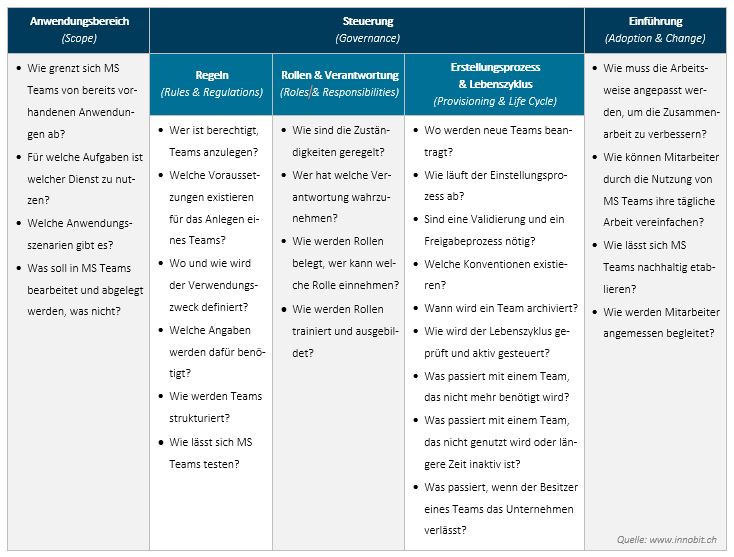
There are three topics to consider so that teams can be used really easily and profitably later on:
- Scope
- Governance
a) Rules & Regulations
b) Roles & Responsibilities
c) Creation process & life cycle (Provisioning & Life Cycle) - Introduction (Adoption & Change)
These requirements are not new in principle. However, their consideration is for the introduction of Cloudservices and, in particular, for collaboration tools such as Microsoft Teams, are of central importance in order to comply with current data protection regulations in addition to a comprehensive user experience. The following table outlines the most important questions to consider as part of the introduction of Microsoft Teams:
An experienced IT partner can help answer these and other questions and derive a tailor-made concept for the rollout of Microsoft Teams. The responsible employees of the company concerned should work closely with the consulting IT partner throughout the entire project. In this way, work processes can be analysed together and practical use cases developed.
Ideally, consulting goes beyond the introduction of Microsoft Teams. In this way, the use of teams not only remains a short-term success, but also leads to greater enjoyment and success in daily collaboration in the long term.